Whether you are working on a home renovation, a new office build-out, or simply organizing messy electrical wires in your workshop, PVC wire duct is one of the most practical, affordable, and durable solutions for cable management. PVC wire duct, also called PVC cable trunking, protects wires from damage, reduces tripping hazards, and keeps your space looking clean and organized, all while being lightweight and easy to work with for both professional electricians and DIY enthusiasts. This guide will walk you through every key step of planning, installing, and finishing a PVC wire duct project to help you achieve a safe, professional-looking result. Before you start any installation work, proper planning and preparation are critical to avoid mistakes and ensure long-term functionality. First, you need to map out the route of your wires and measure the total length of PVC wire duct you will need. Take time to consider the number and size of cables you plan to house: if you are running multiple power wires plus data or HDMI cables, choose a wider and deeper duct size to leave room for future additions. Next, gather all the necessary tools and materials, including PVC wire duct cut to rough lengths, a measuring tape, a pencil, a fine-tooth saw or PVC cutter, sandpaper, a level, mounting screws or adhesive, a screwdriver, and wire ties. Always remember to turn off the main power supply to any electrical circuits you will be working on, and double-check with a non-contact voltage tester to confirm no live current is present before you begin working. Once your planning is complete and your tools are ready, you can start cutting and preparing your PVC wire duct sections to fit your route. It is always better to cut pieces slightly longer than you need at first, then trim them down to get a perfect fit, rather than cutting them too short and wasting material. Mark your cut line on the PVC duct with a pencil, holding a small speed square against the mark to ensure you get a straight, even cut. If you are using a fine-tooth hand saw, clamp the duct to a workbench to keep it steady while cutting, which prevents slipping and gives you a cleaner cut. After cutting, use fine-grit sandpaper to smooth down any rough edges or burrs left on the cut ends; this step not only makes the final installation look neater but also prevents sharp PVC edges from damaging the insulation on your wires. If your route requires turning corners or connecting multiple straight sections, you can cut 45-degree angles on the ends of two sections to form a clean 90-degree corner, or use pre-made PVC corner connectors for a faster, more uniform finish. Next, it is time to mount the base of the PVC wire duct to your wall, ceiling, or floor surface. Start at one end of your planned route, hold the base of the duct against the surface, and use a level to make sure it is perfectly straight before marking the mounting hole locations. For most indoor installations on drywall or wood, you can use short, sharp screws to secure the base every 12 to 18 inches; for concrete or brick walls, use wall anchors to ensure the duct stays securely attached over time. If you are installing the duct on a finished surface where you do not want to drill holes, such as a painted wall or tile backsplash, you can use heavy-duty construction adhesive designed for plastic and masonry instead – just be sure to clean the surface thoroughly with rubbing alcohol before applying adhesive to ensure a strong bond. Once all the base sections are secured, check again that all connections between sections are tight and even, with no gaps that would allow dust or moisture to get inside. After the base is securely mounted, you can start pulling your cables through the duct and organizing them inside. It is a good practice to group similar types of cables together – for example, keep power cables separate from data or audio-visual cables to reduce interference that can affect signal quality. Use small plastic wire ties to loosely bundle groups of cables every few feet, which keeps them neat and prevents them from shifting around inside the duct. Avoid overfilling the duct, as overcrowding makes it harder to add or remove cables later and can trap heat around power wires, which creates a potential fire hazard. Leave at least 20 to 30 percent of the internal space empty for future modifications, which is a common best practice followed by professional installers. Once all your cables are in place and organized, you can snap the cover of the PVC wire duct onto the base to finish the installation. Most PVC wire duct covers have a simple snap-fit design that requires no extra tools or fasteners, making it easy to remove the cover later if you need to add or re-route cables. Finally, do a quick final check to make sure the cover is securely snapped along the entire length, all mounting points are tight, and all cables are properly contained with no loose wires sticking out of the ends of the duct. PVC wire duct is a low-maintenance cable management solution, but there are a few simple tips to keep it working well for years. If you notice any cracked or damaged sections over time, simply cut out the damaged part and replace it with a new section of duct, which is a quick and inexpensive repair. For outdoor installations, make sure you choose a UV-resistant PVC wire duct, as standard PVC can become brittle and crack when exposed to prolonged sunlight. By following these simple steps, you can complete a professional-quality PVC wire duct installation that will keep your wires protected, organized, and safe for decades. Whether you are a DIY beginner or an experienced tradesperson, the simplicity and versatility of PVC wire duct make it the ideal choice for almost any cable management project.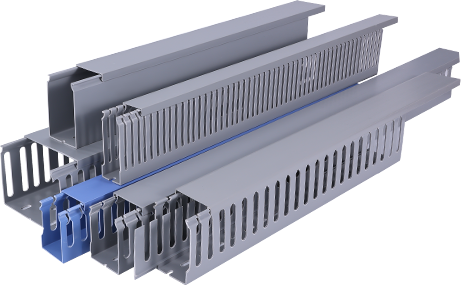
How to PVC Wire Duct: A Complete Step-by-Step Installation Guide
by
Tags: